How does it work?
A Wails application is a standard Go application, with a webkit frontend. The Go part of the application consists of the application code and a runtime library that provides a number of useful operations, like controlling the application window. The frontend is a webkit window that will display the frontend assets. Also available to the frontend is a JavaScript version of the runtime library. Finally, it is possible to bind Go methods to the frontend, and these will appear as JavaScript methods that can be called, just as if they were local JavaScript methods.
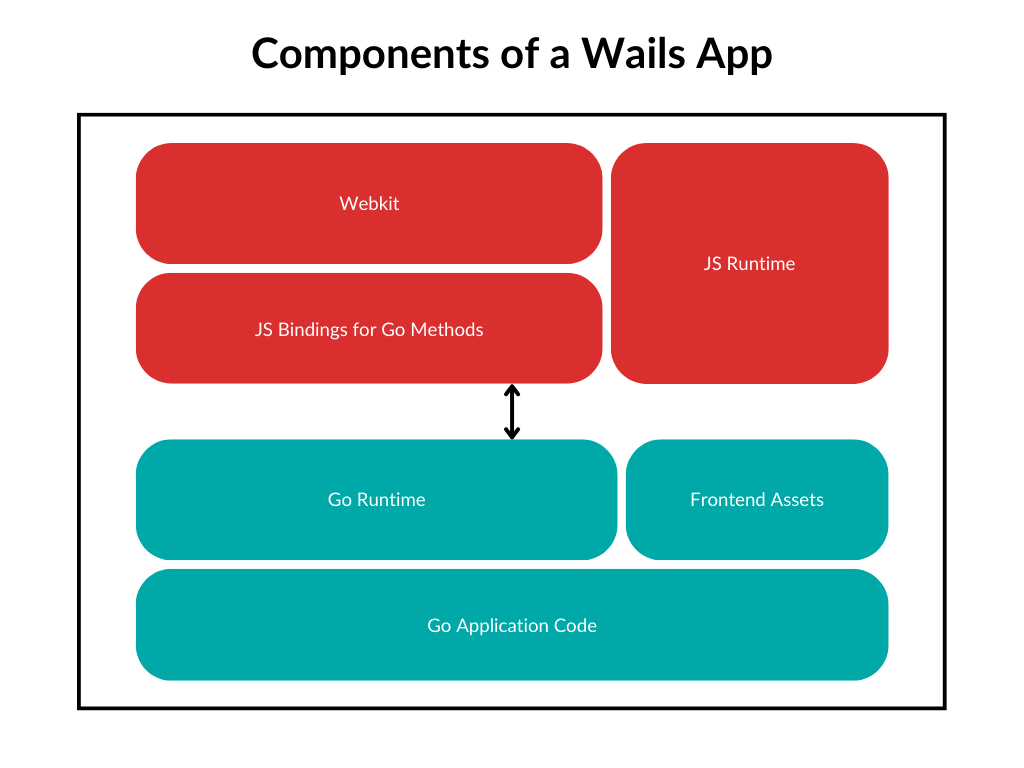
The Main Application
Overview
The main application consists of a single call to wails.Run(). It accepts the application configuration which describes the size of the application window, the window title, what assets to use, etc. A basic application might look like this:
package main

import (
    "embed"
    "log"

    "github.com/wailsapp/wails/v2"
    "github.com/wailsapp/wails/v2/pkg/options"
  "github.com/wailsapp/wails/v2/pkg/options/assetserver"
)

//go:embed all:frontend/dist
var assets embed.FS

func main() {

    app := &App{}

    err := wails.Run(&options.App{
        Title:  "Basic Demo",
        Width:  1024,
        Height: 768,
        AssetServer: &assetserver.Options{
            Assets: assets,
        },
        OnStartup:  app.startup,
        OnShutdown: app.shutdown,
        Bind: []interface{}{
            app,
        },
    })
    if err != nil {
        log.Fatal(err)
    }
}


type App struct {
    ctx context.Context
}

func (b *App) startup(ctx context.Context) {
    b.ctx = ctx
}

func (b *App) shutdown(ctx context.Context) {}

func (b *App) Greet(name string) string {
    return fmt.Sprintf("Hello %s!", name)
}
Options rundown
This example has the following options set:
Title- The text that should appear in the window's title barWidth&Height- The dimensions of the windowAssets- The application's frontend assetsOnStartup- A callback for when the window is created and is about to start loading the frontend assetsOnShutdown- A callback for when the application is about to quitBind- A slice of struct instances that we wish to expose to the frontend
A full list of application options can be found in the Options Reference.
Assets
The Assets option is mandatory as you can't have a Wails application without frontend assets. Those assets can be any files you would expect to find in a web application - html, js, css, svg, png, etc. There is no requirement to generate asset bundles - plain files will do. When the application starts, it will attempt to load index.html from your assets and the frontend will essentially work as a browser from that point on. It is worth noting that there is no requirement on where in the embed.FS the files live. It is likely that the embed path uses a nested directory relative to your main application code, such as frontend/dist:
//go:embed all:frontend/dist
var assets embed.FS
At startup, Wails will iterate the embedded files looking for the directory containing index.html. All other assets will be loaded relative to this directory.
As production binaries use the files contained in embed.FS, there are no external files required to be shipped with the application.
When running in development mode using the wails dev command, the assets are loaded off disk, and any changes result in a "live reload". The location of the assets will be inferred from the embed.FS.
More details can be found in the Application Development Guide.
Application Lifecycle Callbacks
Just before the frontend is about to load index.html, a callback is made to the function provided in OnStartup. A standard Go context is passed to this method. This context is required when calling the runtime so a standard pattern is to save a reference to in this method. Just before the application shuts down, the OnShutdown callback is called in the same way, again with the context. There is also an OnDomReady callback for when the frontend has completed loading all assets in index.html and is equivalent of the body onload event in JavaScript. It is also possible to hook into the window close (or application quit) event by setting the option OnBeforeClose.
Method Binding
The Bind option is one of the most important options in a Wails application. It specifies which struct methods to expose to the frontend. Think of structs like "controllers" in a traditional web application. When the application starts, it examines the struct instances listed in the Bind field in the options, determines which methods are public (starts with an uppercase letter) and will generate JavaScript versions of those methods that can be called by the frontend code.
Wails requires that you pass in an instance of the struct for it to bind it correctly
In this example, we create a new App instance and then add this instance to the Bind option in wails.Run:
package main

import (
    "embed"
    "log"

    "github.com/wailsapp/wails/v2"
    "github.com/wailsapp/wails/v2/pkg/options"
  "github.com/wailsapp/wails/v2/pkg/options/assetserver"
)

//go:embed all:frontend/dist
var assets embed.FS

func main() {

    app := &App{}

    err := wails.Run(&options.App{
        Title:  "Basic Demo",
        Width:  1024,
        Height: 768,
        AssetServer: &assetserver.Options{
            Assets: assets,
        },
        Bind: []interface{}{
            app,
        },
    })
    if err != nil {
        log.Fatal(err)
    }
}


type App struct {
    ctx context.Context
}

func (a *App) Greet(name string) string {
    return fmt.Sprintf("Hello %s!", name)
}
You may bind as many structs as you like. Just make sure you create an instance of it and pass it in Bind:
    //...
    err := wails.Run(&options.App{
        Title:  "Basic Demo",
        Width:  1024,
        Height: 768,
        AssetServer: &assetserver.Options{
            Assets: assets,
        },
        Bind: []interface{}{
            app,
            &mystruct1{},
            &mystruct2{},
        },
    })
You may bind enums types as well. In that case you should create array that will contain all possible enum values, instrument enum type and bind it to the app via EnumBind:
type Weekday string

const (
    Sunday    Weekday = "Sunday"
    Monday    Weekday = "Monday"
    Tuesday   Weekday = "Tuesday"
    Wednesday Weekday = "Wednesday"
    Thursday  Weekday = "Thursday"
    Friday    Weekday = "Friday"
    Saturday  Weekday = "Saturday"
)

var AllWeekdays = []struct {
    Value  Weekday
    TSName string
}{
    {Sunday, "SUNDAY"},
    {Monday, "MONDAY"},
    {Tuesday, "TUESDAY"},
    {Wednesday, "WEDNESDAY"},
    {Thursday, "THURSDAY"},
    {Friday, "FRIDAY"},
    {Saturday, "SATURDAY"},
}
    //...
    err := wails.Run(&options.App{
        Title:  "Basic Demo",
        Width:  1024,
        Height: 768,
        AssetServer: &assetserver.Options{
            Assets: assets,
        },
        Bind: []interface{}{
            app,
            &mystruct1{},
            &mystruct2{},
        },
    EnumBind: []interface{}{
        AllWeekdays,
    },
    })
When you run wails dev (or wails generate module), a frontend module will be generated containing the following:
- JavaScript bindings for all bound methods
- TypeScript declarations for all bound methods
- TypeScript definitions for all Go structs used as inputs or outputs by the bound methods
This makes it incredibly simple to call Go code from the frontend, using the same strongly typed datastructures.
The Frontend
Overview
The frontend is a collection of files rendered by webkit. It's like a browser and webserver in one. There is virtually1 no limit to which frameworks or libraries you can use. The main points of interaction between the frontend and your Go code are:
- Calling bound Go methods
- Calling runtime methods
Calling bound Go methods
When you run your application with wails dev, it will automatically generate JavaScript bindings for your structs in a directory called wailsjs/go (You can also do this by running wails generate module). The generated files mirror the package names in your application. In the example above, we bind app, which has one public method Greet. This will lead to the generation of the following files:
wailsjs
  └─go
    └─main
      ├─App.d.ts
      └─App.js
Here we can see that there is a main package that contains the JavaScript bindings for the bound App struct, as well as the TypeScript declaration file for those methods. To call Greet from our frontend, we simply import the method and call it like a regular JavaScript function:
// ...
import { Greet } from "../wailsjs/go/main/App";

function doGreeting(name) {
  Greet(name).then((result) => {
    // Do something with result
  });
}
The TypeScript declaration file gives you the correct types for the bound methods:
export function Greet(arg1: string): Promise<string>;
The generated methods return a Promise. A successful call will result in the first return value from the Go call to be passed to the resolve handler. An unsuccessful call is when a Go method that has an error type as it's second return value, passes an error instance back to the caller. This is passed back via the reject handler. In the example above, Greet only returns a string so the JavaScript call will never reject - unless invalid data is passed to it.
All data types are correctly translated between Go and JavaScript. Even structs. If you return a struct from a Go call, it will be returned to your frontend as a JavaScript class.
Struct fields must have a valid json tag to be included in the generated TypeScript.
Anonymous nested structs are not supported at this time.
It is possible to send structs back to Go. Any JavaScript map/class passed as an argument that is expecting a struct, will be converted to that struct type. To make this process a lot easier, in dev mode, a TypeScript module is generated, defining all the struct types used in bound methods. Using this module, it's possible to construct and send native JavaScript objects to the Go code.
There is also support for Go methods that use structs in their signature. All Go structs specified by a bound method (either as parameters or return types) will have TypeScript versions auto generated as part of the Go code wrapper module. Using these, it's possible to share the same data model between Go and JavaScript.
Example: We update our Greet method to accept a Person instead of a string:
type Person struct {
    Name string `json:"name"`
    Age uint8 `json:"age"`
    Address *Address `json:"address"`
}

type Address struct {
    Street string `json:"street"`
    Postcode string `json:"postcode"`
}

func (a *App) Greet(p Person) string {
    return fmt.Sprintf("Hello %s (Age: %d)!", p.Name, p.Age)
}
The wailsjs/go/main/App.js file will still have the following code:
export function Greet(arg1) {
  return window["go"]["main"]["App"]["Greet"](arg1);
}
But the wailsjs/go/main/App.d.ts file will be updated with the following code:
import { main } from "../models";

export function Greet(arg1: main.Person): Promise<string>;
As we can see, the "main" namespace is imported from a new "models.ts" file. This file contains all the struct definitions used by our bound methods. In this example, this is a Person struct. If we look at models.ts, we can see how the models are defined:
export namespace main {
  export class Address {
    street: string;
    postcode: string;

    static createFrom(source: any = {}) {
      return new Address(source);
    }

    constructor(source: any = {}) {
      if ("string" === typeof source) source = JSON.parse(source);
      this.street = source["street"];
      this.postcode = source["postcode"];
    }
  }
  export class Person {
    name: string;
    age: number;
    address?: Address;

    static createFrom(source: any = {}) {
      return new Person(source);
    }

    constructor(source: any = {}) {
      if ("string" === typeof source) source = JSON.parse(source);
      this.name = source["name"];
      this.age = source["age"];
      this.address = this.convertValues(source["address"], Address);
    }

    convertValues(a: any, classs: any, asMap: boolean = false): any {
      if (!a) {
        return a;
      }
      if (a.slice && a.map) {
        return (a as any[]).map((elem) => this.convertValues(elem, classs));
      } else if ("object" === typeof a) {
        if (asMap) {
          for (const key of Object.keys(a)) {
            a[key] = new classs(a[key]);
          }
          return a;
        }
        return new classs(a);
      }
      return a;
    }
  }
}
So long as you have TypeScript as part of your frontend build configuration, you can use these models in the following way:
import { Greet } from "../wailsjs/go/main/App";
import { main } from "../wailsjs/go/models";

function generate() {
  let person = new main.Person();
  person.name = "Peter";
  person.age = 27;
  Greet(person).then((result) => {
    console.log(result);
  });
}
The combination of generated bindings and TypeScript models makes for a powerful development environment.
More information on Binding can be found in the Binding Methods section of the Application Development Guide.
Calling runtime methods
The JavaScript runtime is located at window.runtime and contains many methods to do various tasks such as emit an event or perform logging operations:
window.runtime.EventsEmit("my-event", 1);
More details about the JS runtime can be found in the Runtime Reference.